

Keeping your Amazon Order Defect Rate (ODR) in good shape is part of maintaining a healthy seller account. It tracks the percentage of your orders that lead to issues like A-to-Z claims, chargebacks, or negative customer feedback.
ODR often rises because small issues go unnoticed until they turn into claims or complaints. A late carrier scan, a missing accessory, or unclear listing detail can all trigger a defect once the buyer reports a problem. What’s challenging is that, because Amazon logs these issues behind the scenes, you often won’t notice an issue until it’s too late.
In this guide, you’ll learn exactly how ODR is calculated, what issues cause it to increase, and the exact steps you can take to keep it safely below 1%. You’ll see how building good habits in communication, fulfillment, and listing accuracy can help you catch potential problems earlier and protect your seller account health so you can continue to see success on Amazon.
What Is the Amazon Order Defect Rate (ODR)?
The Amazon Order Defect Rate (ODR) measures how often a seller’s orders lead to serious customer problems. Amazon uses it to track service quality and protect the buying experience. The number represents the percentage of orders that experience negative feedback, A-to-Z Guarantee claims, or credit card chargebacks. It is tracked over a rolling 60-day period.
A low ODR signifies that buyers are getting what they expect. This means on-time delivery, good customer support, and a product that matches the images and description from your listing. A high ODR signals the opposite, pointing to issues like late deliveries, mismatched listings, or poor customer support.
As an Amazon seller, you are required to keep your ODR below 1%. That means for smaller or new sellers, even one or two problem orders can be a big problem. Once your rate climbs above the 1% threshold, Amazon may send you a performance warning, restrict your listings, or, in severe cases, suspend your seller account.
From my own experience, ODR is a mirror into how well your business is being run. If your product listings are accurate, your products match their descriptions, and you handle customer support on time, the number usually takes care of itself.
Why the Order Defect Rate Matters to Sellers
Your ODR is a signal to Amazon of what kind of seller you are. It shows how often customers encounter serious problems with their orders and helps Amazon decide which sellers to feature more prominently in search results and on product pages.
When your ODR is low, it supports better visibility for your products. You’re more likely to win the Buy Box, and your ability to get ungated to sell in additional categories and brands is improved.
If your rate climbs above 1%, Amazon starts considering you a risky seller. You may first see a performance warning appear in Seller Central, letting you know that your account is at risk. If the problems continue, Amazon may restrict certain listings or limit your ability to sell specific products. Ongoing issues can lead to a full account suspension until the root causes are resolved.
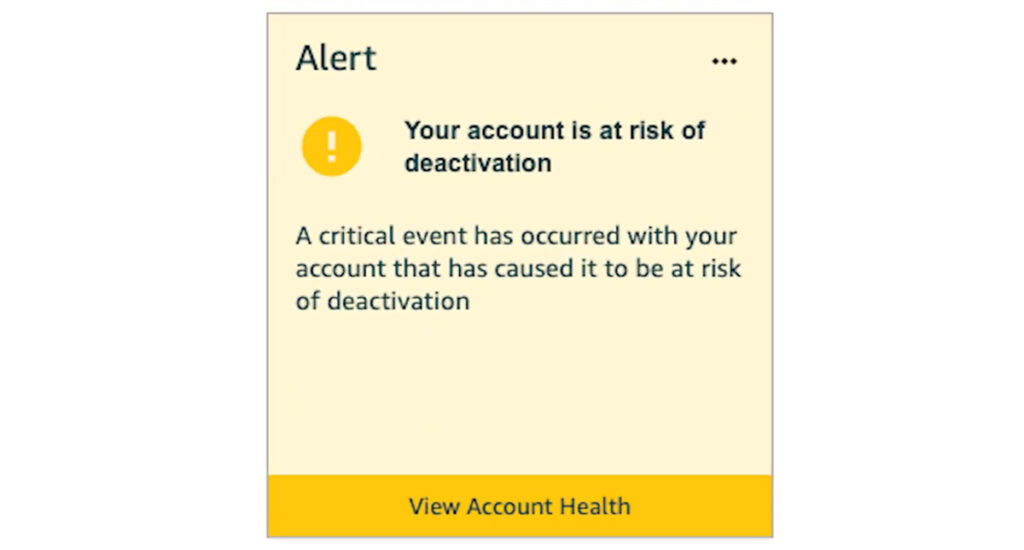
Even if your account is not suspended or your listings aren’t restricted, there are still side effects that come from a high ODR. One of the biggest is a sharp drop in your chances of winning the Buy Box. As we explain in our article on How to Win the Buy Box in 2026, seller account health is one of the factors Amazon considers when choosing a winner. If your ODR is too high, it puts you at a clear disadvantage.
You’ll also start to see lower organic search rankings. Amazon’s search algorithm favors sellers who consistently provide smooth, reliable service. Falling behind on ODR makes it harder for your listings to appear high in search results, which can have a big impact on your sales figures.
How Is the Amazon Order Defect Rate Calculated?
Amazon calculates your Order Defect Rate (ODR) by comparing the number of defective orders to your total orders over a 60-day period. The formula is:
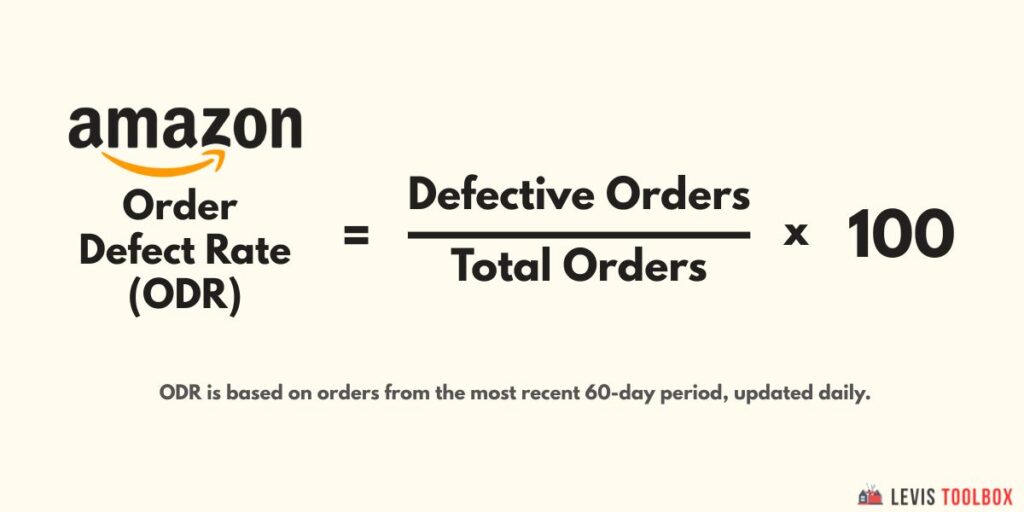
Amazon bases the calculation on the date the product was ordered, not the date of the feedback or A-Z claim. This matters because customers often leave feedback or file claims weeks after their purchase. It’s also worth pointing out that if an order triggers more than one issue, such as a negative review and a chargeback, it will still only count as a single defect.
Your rating is tracked on a rolling 60-day window, but updates with a bit of a delay. Data usually appears about two weeks after the related orders, so your dashboard reflects roughly the past 75 days of activity.
If you are an FBA seller, issues caused by Amazon’s fulfillment network, like delays or damage, don’t count towards your score. Claims that are denied, withdrawn, or linked to fraud are also excluded. This keeps the score focused on only the issues that you, as the seller, are responsible for.
What Makes an Order Defective on Amazon?
One of the main sources for defective orders is A-to-Z Guarantee claims. These happen when customers believe they didn’t receive what they ordered, or there were delivery issues. Late shipments, bad tracking info, or poor packaging are common triggers for these claims. If Amazon determines that you are at fault and you didn’t handle the situation correctly, the claim will count as a defect and raise your ODR.
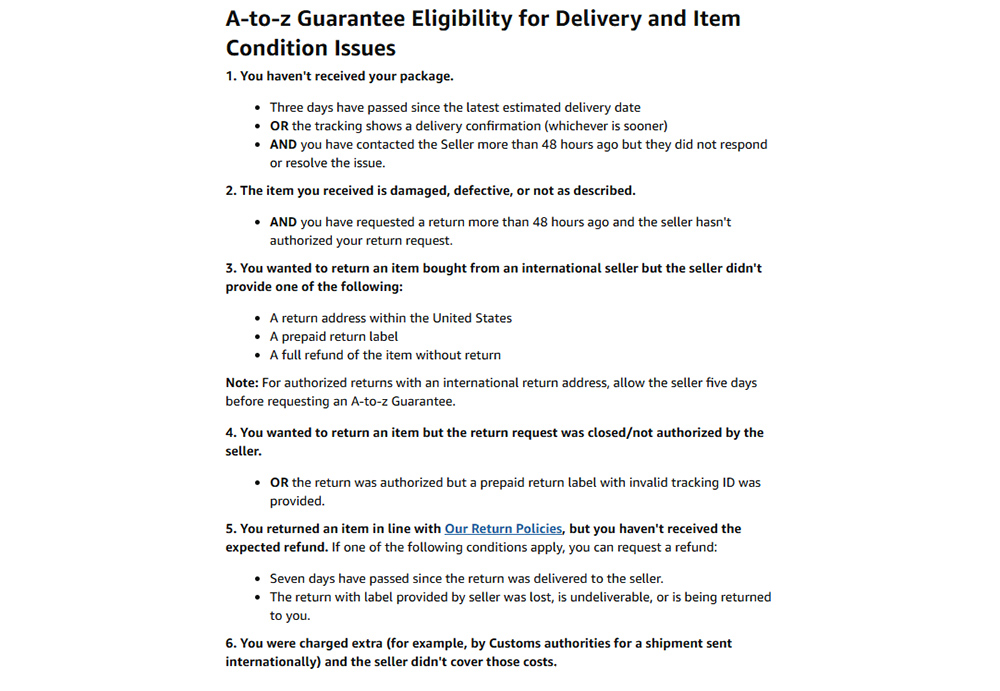
A second major cause is negative seller feedback. If a buyer leaves a negative one or two-star seller review, this will count towards your Order Defect Rate. The causes of these reviews could be anything from damaged items, shipping delays, or a mismatch between what the shopper expected and what they actually received. I do want to stress here that only seller feedback is considered as part of your ODR; product reviews are not counted and do not impact your ODR.
Service-related chargebacks are also a cause of increased ODR. This happens when a buyer disputes a charge through their bank, claiming they didn’t receive the item or that it arrived in poor condition. If the credit card company sides with the buyer, the chargeback counts as a defect. From my own experience, the number one way to avoid this issue comes down to a single word: communication. When buyers feel heard and supported, most disputes never reach the point of becoming chargebacks.
Besides these three main categories, ODR can also be impacted by smaller issues. For example, sellers who cancel orders frequently or fail to confirm shipments on time can run into ODR issues even if the sale never completes. The bottom line is that most high ODR issues trace back to avoidable mistakes.
How to Check and Monitor Your ODR in Seller Central
Amazon makes it easy to track your Order Defect Rate from inside Seller Central. You can find your current performance metrics in the Account Health Dashboard, which gives you a quick snapshot of how your business is performing over the most recent 60-day window.
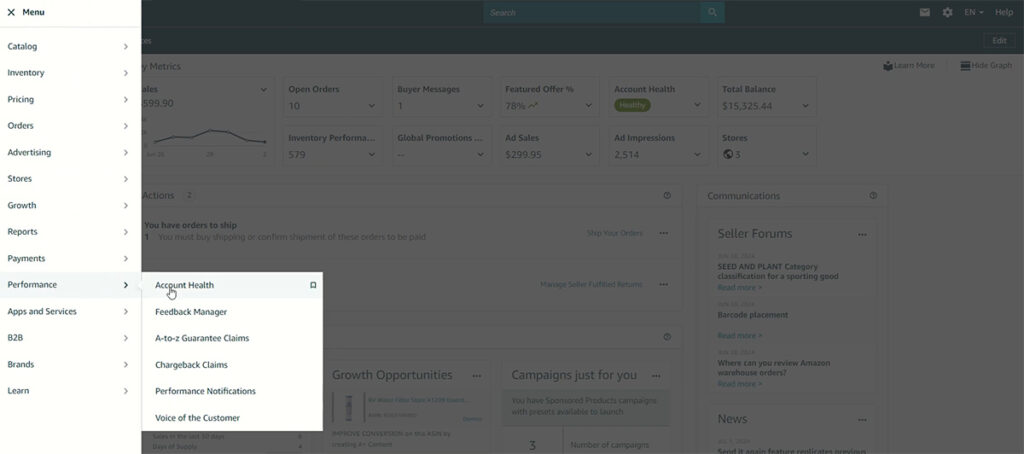
To check your ODR, log in to Seller Central and open the main menu. Select the “Performance” tab and scroll over to “Account Health.” Inside this page, you’ll see a Customer Service Performance section. This is where you’ll find your current Order Defect Rate, displayed as a percentage. It will also notify you if your ODR is in the safe range (below 1%) or if you are at risk of exceeding the threshold.
You can also view a full breakdown of your defects by category, including negative seller feedback, A-to-Z Guarantee claims, and chargebacks. I recommend taking a look at least once a month to see what’s causing you the most trouble. If you want a more “zoomed out” view of your business, there is also the option to view your account’s performance over the last 12 months.
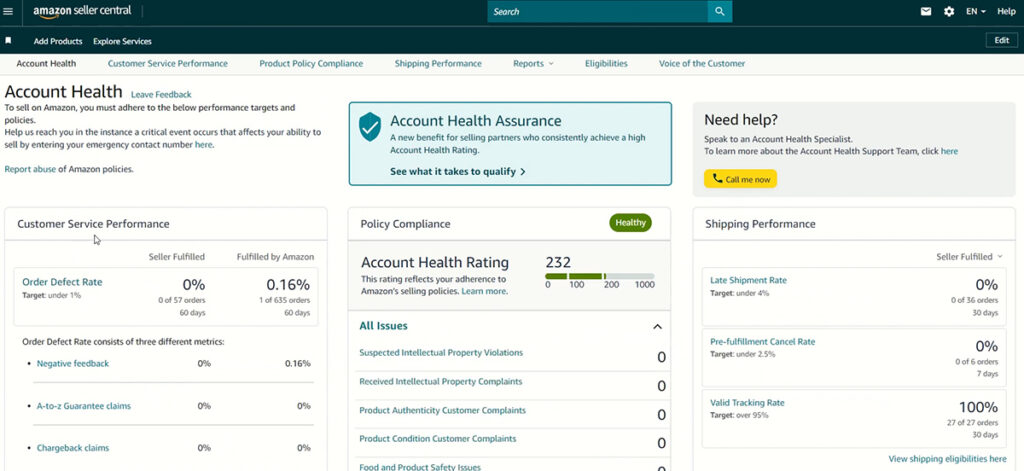
If you want to take a deeper look, there is also an option to download a report. You can select a date range and download a file containing information on each defective order, including defect type, reason codes, and resolution status.
5 Proven Ways to Reduce Your Amazon ODR
A healthy Order Defect Rate starts with consistency. When your listings are accurate, your fulfillment is reliable, and your communication is quick, you are well on your way to maintaining a low ODR. Here are five habits that can help you keep your Order Defect Rate safely under 1%.
1. Keep Listings Honest and Accurate
Many ODR issues come down to a mismatch between what the buyer expects and what they actually receive. Review every product title, image, and bullet point to make sure the description matches the exact product in the box. Add measurements, compatibility notes, and color details to remove any points of confusion. If you notice repeat complaints or common questions about one of your products, update the listing before it becomes another negative review.
For a complete guide on how to create a product listing that converts, check out our full guide on Amazon Product Listing Optimization.
2. Ship on Time and Use Reliable Carriers
Shipping issues are another common reason for unhealthy ODRs. Late or missing deliveries can quickly lead to A-to-Z claims and negative feedback. If you’re an FBM seller, ship orders promptly and always use carriers with reliable tracking and delivery records. Avoid setting unrealistic handling times you can’t maintain, so customers have a clear expectation of when to expect their product to arrive.
If you’re having trouble finding reliable shipping services in your area, or you’re selling a high-volume product, switching to FBA can eliminate this issue almost entirely.
3. Respond to Feedback Fast
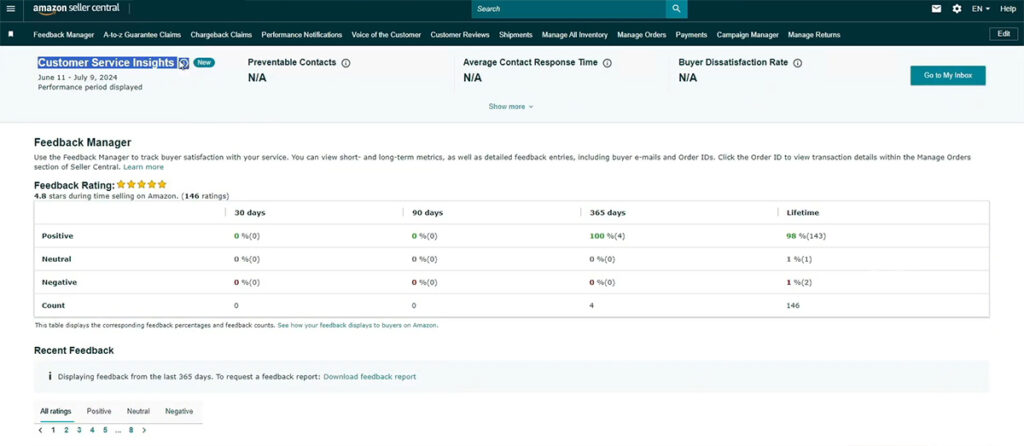
Just because a shopper leaves a negative review doesn’t mean it has to stay that way. If you aren’t already, I recommend always replying within 24 hours, apologizing when appropriate, and offering a clear solution. Many buyers will update or even remove their feedback once they see you really care.
If you’re using FBA fulfillment and the feedback mentions shipping delays or damaged packaging, request removal through the Feedback Manager in Seller Central. Amazon usually takes those off, which helps improve your ODR.
4. Stay Organized When Responding to A-to-Z Claims
When an A-to-Z claim appears, respond as soon as you can and attach everything that helps Amazon understand what happened. Add tracking details, your message history with the buyer, and photos if the claim involves product condition or packaging. Clear documentation makes it easier for Amazon to see whether you followed the policy.
If Amazon rules against you and you believe you were in the right, submit an appeal with the same evidence. A well-organized appeal often leads to a reversal, which results in a better Order Defect Rate.
5. Check Quality and Packaging Before Every Shipment
Even small packaging upgrades, like switching to sturdier mailers or reinforcing seams, can prevent a surprising number of complaints. In my experience, most defects tied to “item not as described” or “damaged on arrival” come from small quality-control issues rather than one major mistake.
A quick inspection before shipping helps you catch the most common complaints right away: scuffed packaging, loose accessories, missing parts, or items that don’t match your listing photos. If you sell used or refurbished products, make sure to follow Amazon’s condition guidelines. Grade your product conservatively so buyers are more likely to receive something that meets or exceeds what they expected instead of being disappointed.
Frequently Asked Questions (FAQs)
What happens if my Amazon Order Defect Rate goes above 1%?
If your Order Defect Rate (ODR) rises above 1%, Amazon flags your account as “at risk.” You could lose the Buy Box, face listing restrictions, or even get your seller account suspended if the issue continues. Amazon will typically send you a performance notification first, but repeated problems can lead to your seller account being deactivated.
What counts as a “defect” in the Amazon Order Defect Rate?
Amazon counts a defect whenever an order has negative feedback, an A-to-Z Guarantee claim, or a service-related chargeback. Each affected order counts only once, even if it has multiple issues. Fraud chargebacks, withdrawn claims, or feedback later removed by Amazon do not count towards your ODR.
How often is ODR updated, and when do defects drop off my score?
Your ODR updates daily based on a rolling 60-day window. As time passes, older defects will be removed from your account once they fall outside of that range. Updates can sometimes lag behind by a few days, so changes aren’t always visible right away. However, from my experience, if you build the habit of consistently responding to unhappy customers and work with reliable suppliers, you will notice your ODR will continue to fall over time.
Does FBA-related negative feedback count toward my ODR?
FBA orders impact your ODR only if the issue stems from something you control (like product quality or listing accuracy). Any feedback reflecting late delivery, damaged packaging, or other fulfillment errors handled by Amazon doesn’t count once Amazon strikes it or removes it. I recommend regularly checking your Feedback Manager to verify that Amazon has cleared any FBA-related feedback from your account.
Where can I see my ODR in Seller Central, and can I download the details?
You can view your Order Defect Rate in Seller Central by clicking on the Performance tab and then Account Health. This will display your current percentage and a 60-day date range. Click the download option at the bottom to export your ODR report, which lists feedback, claims, and chargebacks. I recommend checking this report regularly (at least once a month) to track any potential issues before they trigger performance warnings.
Final Thoughts on Keeping Your Amazon Order Defect Rate Below 1%
Keeping your Order Defect Rate low is a sign that you are running a reliable business on Amazon. Each claim, chargeback, or negative review can be a sign that something in your process could be improved. When you treat these issues as learning experiences instead of frustrations, they can help you take your business to the next level.
Sellers who review their account health often and take action early tend to avoid major problems down the road. A few minutes spent reading through reviews or following up with unhappy buyers can prevent weeks of lost sales or extra stress.
Good account health isn’t built overnight. It comes from consistency and developing habits that protect your brand, keep customers satisfied, and show Amazon that your business is reliable and can be trusted for the long run.
Related Articles
- How to Create an Amazon Seller Account (Step-by-Step Guide for 2026)
- How Much Are Amazon Seller Fees? A Complete Breakdown
- How to Start an Amazon FBA Business in 7 Simple Steps (Beginner’s Guide)

Levi Adler is an experienced Amazon seller, e-commerce specialist, and the founder of Levi’s Toolbox. With over a decade in the trenches selling on Amazon and managing his own Shopify stores, Levi writes from his own experience. Sharing what worked, what flopped, and the strategies he wishes he’d known sooner. When he’s optimizing listings or managing ad campaigns, you’ll find Levi hitting mountain bike trails or hanging out with his two huskies, Emma and Scout.
